Returns are costly, with $890 billion in merchandise sent back in 2024 alone. For Shopify merchants, return rates average 17%–20%, cutting into profits due to shipping, inspection, and damaged goods. Without a clear process, returns create inventory chaos, delays refunds, and frustrate customers. Yet, 96% of shoppers will buy again after an easy return experience. This guide explains how to manage returns effectively, recover value, and improve customer loyalty.
Key Takeaways:
- Inspection Process: Set up a dedicated area for returns and use a checklist to evaluate damage, packaging, and accessories.
- Grading System: Sort items into Grades A–D to decide whether to restock, refurbish, liquidate, or recycle.
- Technology Use: Automate approvals, track inventory in real-time, and offer QR code returns for convenience.
- Performance Metrics: Monitor return rates, preventable issues, and resale recovery to improve operations.
A structured system ensures faster processing, reduces costs, and keeps customers coming back.
What is Quality Control? QC Explained For eCommerce Sellers
sbb-itb-a3e286c
Creating a Standard Inspection Process
Set up a designated inspection area specifically for returns. Keep returned items completely separate from new inventory in your receiving lines. This means creating dedicated inspection lanes where your team can focus solely on evaluating returned products without distractions.
"Distribution centers should have a separate workspace for the return shipments. They should have a proper process to handle the returns and also train their staff on what to do to properly process returns."
– Erin LaCkore, Founder, LaCkore Couture
When a return comes in, the first step is to scan the RMA or barcode immediately. This ensures the SKU and quantity match what was expected and helps avoid untracked inventory piling up in your warehouse. Once scanned, sort returns into categories - like electronics or apparel - for more efficient and tailored inspections.
Creating an Inspection Checklist
A thorough inspection checklist should cover three key areas: checking for damage, verifying packaging and labels, and ensuring all accessories or manuals are included. For apparel and footwear, hygiene checks are especially important - look for dirt on shoe soles and inspect fabrics for odors or stains to confirm the items are unworn.
With 81% of returns stemming from damage and 75% from fit issues, even small defects need to be flagged. To streamline this process, post a simple grading chart (Grade A through D) at every inspection station. This standardized system helps your team decide the next steps quickly and consistently.
Once the grading is complete, update your system immediately with the inspection results.
Recording Inspection Results
Accurate logging is critical for keeping your inventory in order. Equip your team with mobile barcode scanners to update your Warehouse Management System (WMS) in real time. This live tracking prevents customer service from being bombarded with "where is my refund?" inquiries.
For damaged items, take photos and log them as evidence. These images can be used for fraud disputes, insurance claims, or supplier chargebacks. It’s also essential to record the reason for the return - whether it’s a fit issue, a color mismatch, or something else. This data is a goldmine for your merchandising team, helping them refine product descriptions and reduce future returns. Considering that 56% of returns are due to items not matching their product descriptions, addressing these discrepancies can save money and improve customer trust.
Setting Up a Condition Grading System
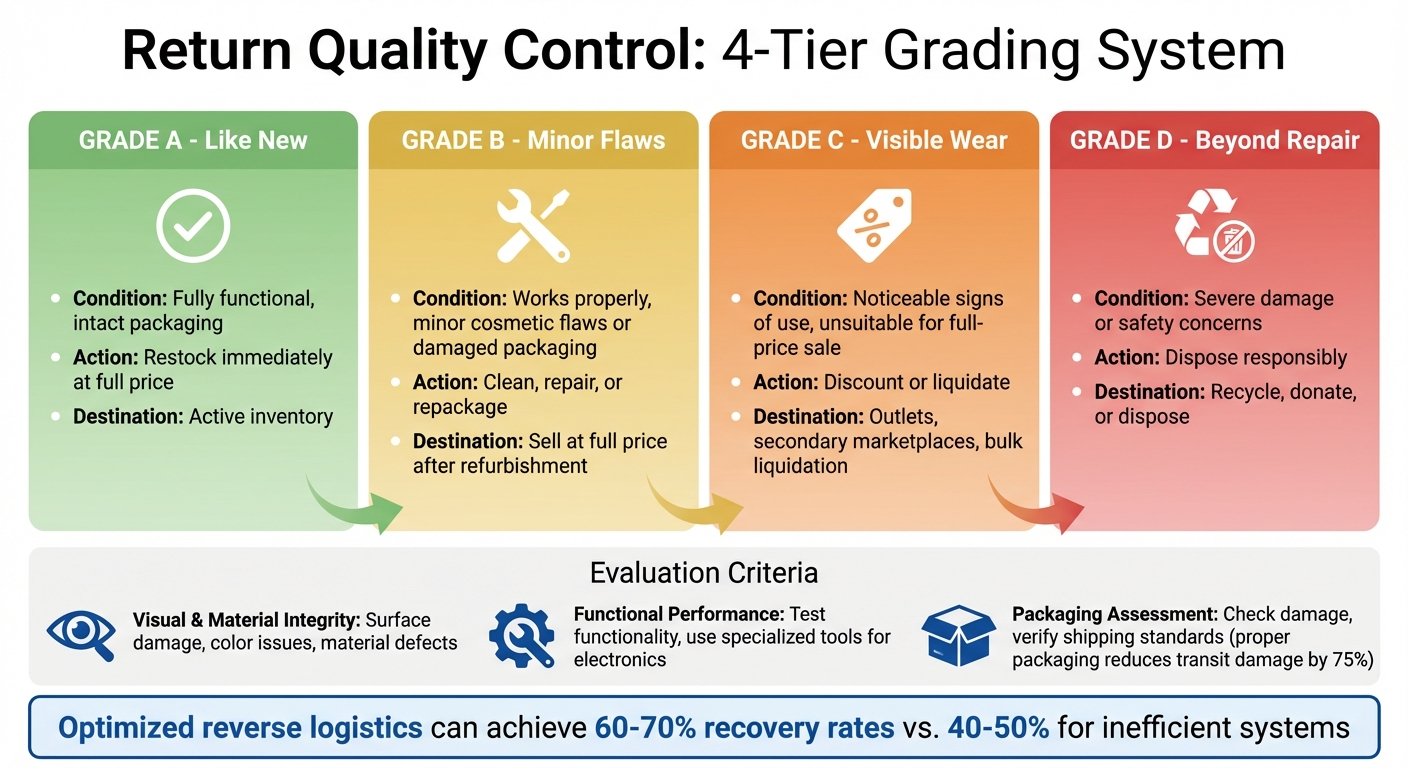
4-Tier Return Quality Control Grading System for E-commerce
Once you've established an inspection checklist, the next step is creating a standardized grading framework. This ensures consistency in how returned items are evaluated. With everyone following the same criteria, you can eliminate the "in-between" items that tend to pile up and slow down your inventory system. The process is simple: assign a grade, decide the next step, and route the item to its appropriate destination right away.
Creating Grading Tiers
A four-tier grading system (Grades A through D) provides clear categories for returned items:
- Grade A: These items are in like-new condition, fully functional, and have intact packaging. They can go straight back into your active inventory.
- Grade B: Items in this category work properly but may have minor cosmetic flaws or damaged packaging. These require cleaning, minor repairs, or repackaging before being sold at full price.
- Grade C: These items show noticeable signs of use, making them unsuitable for full-price sale. They should be directed to outlets, secondary marketplaces, or bulk liquidation channels.
- Grade D: Items in this grade are beyond repair or resale due to severe damage or safety concerns. They should be recycled, donated, or disposed of responsibly.
To assign these grades, your team should evaluate three key aspects for each item:
- Visual & Material Integrity: Look for surface damage, color inconsistencies, or material defects.
- Functional Performance: Test the item's functionality. For electronics, this might involve using specialized tools like oscilloscopes.
- Packaging Assessment: Check for damage and ensure the packaging meets shipping standards. Proper packaging can reduce transit damage by as much as 75%.
Using Grades to Speed Up Restocking
Once items are graded, the next step is streamlining their movement through your system. Grade-based routing allows for automated workflows. For example:
- Grade A items can be returned to active inventory bins the same day they arrive.
- Grade B items can be sent to a refurbishment station for necessary fixes.
- Grade C items can be moved to a liquidation holding area.
This approach ensures items are processed quickly. Delays in handling returns can decrease their value or even render them unsellable.
To make the system even more efficient, integrate grading data with your Warehouse Management System (WMS). For instance, when an associate scans an item as "Grade A", your Shopify store can immediately show it as available for sale. By optimizing reverse logistics in this way, recovery rates can reach 60–70%, compared to just 40–50% for less efficient systems.
Using Technology for Return Quality Control
Handling returns manually can be a major drain on resources. By combining streamlined inspection processes with advanced technology, businesses can speed up returns, automate repetitive tasks, and ensure consistent decision-making throughout their operations.
Automating Return Inspections
Automation takes the hassle out of manual reviews, addressing one of the biggest bottlenecks in the returns process. For example, automated systems can instantly approve certain returns - like items under $50 within the return window - while flagging higher-value orders (over $500) for fraud checks.
Take ForthRoute as an example. Its smart rules engine lets businesses set specific policies, such as "Auto-approve returns for non-Final Sale items" or "Reject returns submitted after 30 days." When a customer initiates a return, the system either approves it instantly or flags it for further review. This reduces the need for customer support intervention while still allowing exceptions to be managed effectively.
Automation also helps retain revenue through exchange prioritization. Instead of defaulting to refunds, tools like ForthRoute suggest exchanges or store credit options. For instance, if a customer returns a shirt because it’s "too small", the system might recommend the next size up. This keeps money in your business instead of refunding it to the customer’s bank account.
The impact of automation is clear. In September 2023, QALO implemented EasyPost's shipping API and tracking webhooks to automate their returns process. This reduced their return processing time from 7–14 days to just 2–5 days by cutting out manual steps.
This automated foundation also opens the door to other efficient solutions, like QR code labels, which simplify the returns experience even further.
Simplifying Returns with QR Codes
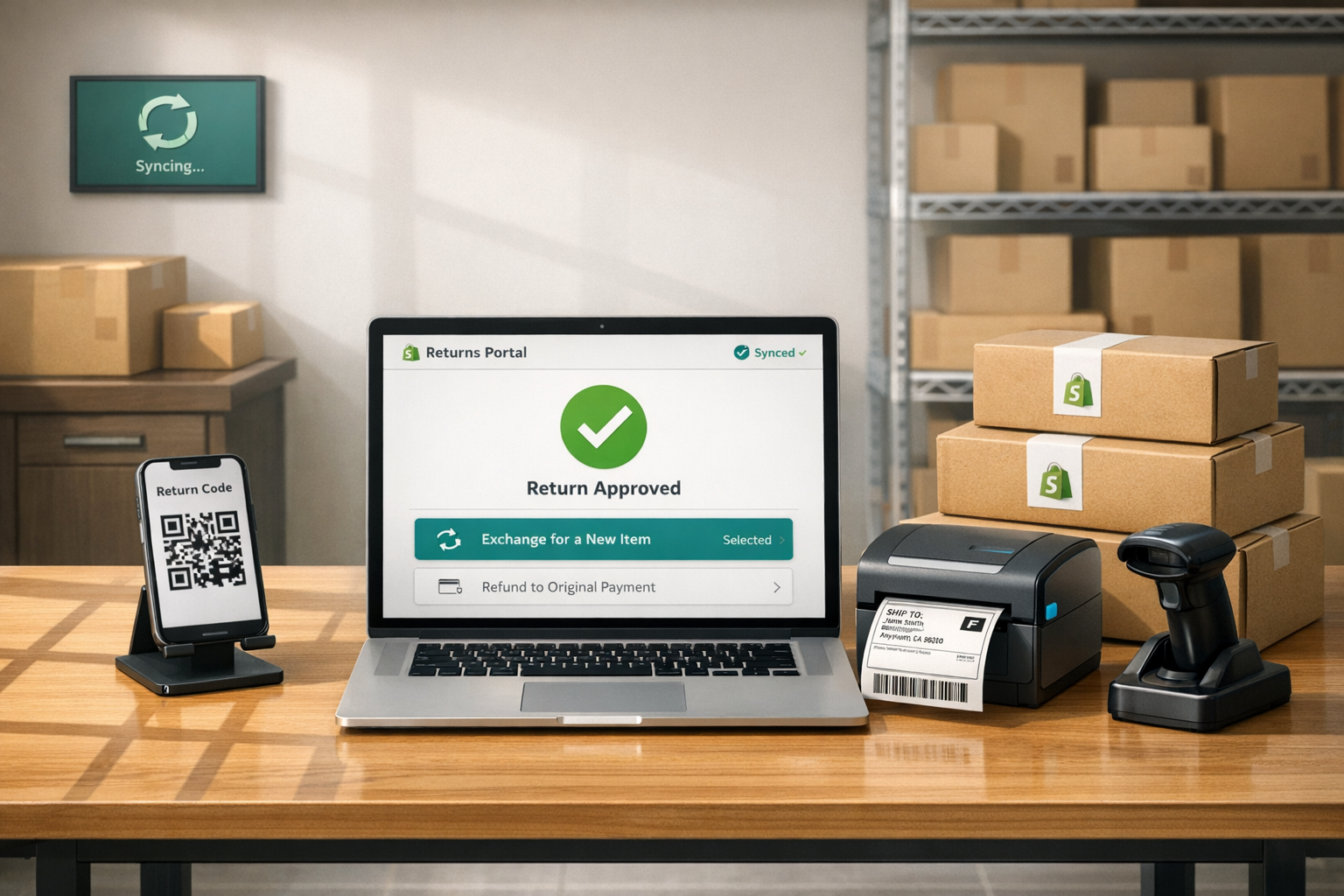
Even with automation, printed labels can still cause headaches for customers. Many people don’t have access to printers, which can lead to abandoned returns or additional support requests. QR code returns solve this problem by allowing customers to show a code on their phone at drop-off points like USPS or UPS. The carrier scans the code and prints the label for them, making the process seamless.
This innovation removes one of the biggest barriers to completing returns. In fact, 76% of consumers say an easy return process is a key factor when choosing where to shop. QR codes also provide instant tracking updates and eliminate the confusion of "mystery boxes" in warehouses. Since each QR code is tied to a specific Return Merchandise Authorization (RMA), teams can identify and route incoming packages before they even arrive.
ForthRoute integrates QR code returns with EasyPost, offering customers the option to receive a digital code instead of a traditional PDF label. They simply take the package to a participating carrier location, where the label is printed on-site. This added convenience boosts customer satisfaction - 96% of shoppers who had an "easy" or "very easy" returns experience said they’d shop with that retailer again.
By combining automated approvals with simplified label generation, these tech-driven solutions ensure faster inventory updates and consistent quality control across the entire returns process.
| Automation Feature | Impact on Manual Workload | Business Benefit |
|---|---|---|
| Instant Approval Rules | Reduces the need for manual RMA reviews. | Speeds up refunds and exchanges. |
| QR Code Returns | Solves label printing issues without support. | Improves customer satisfaction and reduces friction. |
| Exchange Workflows | Automates replacement order creation. | Retains revenue and lowers churn rates. |
| Returnless Refunds | Skips physical inspection and shipping entirely. | Saves on labor and shipping for low-value items. |
Deciding What to Do After Inspection
Once items are graded, the next step is to assign each one a clear course of action. Having a structured decision framework eliminates guesswork and speeds up processing. The ultimate aim? Get the most value back while keeping items from sitting idle.
Decision Framework for Returns
Here’s how items should be handled based on their condition:
- Grade A items: These are in perfect condition, complete with original packaging. Restock them immediately at full price.
- Grade B items: These may have minor cosmetic flaws or damaged packaging but are still functional. Refurbish or repackage these and sell them at a discount.
- Grade C items: These show visible wear but still work. Send them to secondary channels like outlet stores or bulk liquidation.
- Grade D items: Unsellable items should go straight to recycling or disposal.
For products priced between $15 and $40, if the combined cost of shipping and labor outweighs their resale value, it’s often better to issue a returnless refund.
ForthRoute simplifies this process by automating disposition rules. For example, you can program it to "Auto-approve returns under $50" or "Reject items marked Final Sale." Approved returns are instantly routed to their next step - whether that’s a refund, store credit, or an exchange. If a customer selects "Too small" as the reason for their return, the system can suggest the next size up as an exchange. This approach keeps revenue in-house and reduces refunds. Why does this matter? Because 76% of shoppers say free and easy returns influence where they shop.
Once these processes are in place, the next step is to track performance metrics to refine your operations.
Tracking Performance Metrics
Start by keeping an eye on your return rate, which is the percentage of total orders that get sent back. As a benchmark, apparel tends to have return rates of 20–40%, while electronics hover between 5–15%. If your numbers are much higher, it’s worth digging into the causes.
Another key metric is your preventable return rate. This measures returns caused by issues like inaccurate product descriptions, sizing problems, or poor packaging. If this rate goes above 10%, take a closer look at your product descriptions or warehouse practices. For any product with a return rate over 15–20%, update its product detail page (PDP) to better manage customer expectations.
Don’t forget to calculate your cost per return. Many businesses underestimate this by 20–40% because they focus only on shipping costs and overlook labor, materials, and the loss in value. Finally, track your resale recovery rate, which shows how much value you retain after restocking or liquidation. If this falls below 60%, it’s a sign that items are spending too much time in processing.
ForthRoute makes it easy to monitor these metrics in real time. You can see which products are returned most often and why (e.g., "Fit runs small"), analyze return shipping costs by SKU, and identify products that aren’t profitable. This data helps you make proactive adjustments to product listings, sizing guides, or quality checks before return rates become a bigger problem.
| Metric | Definition | Benchmark/Signal |
|---|---|---|
| Return Rate | Percentage of total orders returned | 20–40% for apparel; 5–15% for electronics |
| Preventable Return Rate | Returns due to sizing, PDP errors, or poor packing | If >10%, review product descriptions or warehouse procedures |
| Cost Per Return | Total cost (shipping + labor + materials + value loss) | Often underestimated by 20–40% |
| Resale Recovery | Value retained after restocking or liquidation | If <60%, items are sitting too long before processing |
Conclusion
Managing return quality control doesn’t have to drain your resources. By standardizing inspections and condition grading, you can establish a reliable system that eliminates guesswork and speeds up decision-making. Companies that have embraced this approach report a 20% drop in defects and a 30% cut in rework and scrap costs. Careful attention to quality control reduces error rates by 30% and trims processing times by 25%.
Integrating technology into your returns process can turn a traditional cost center into a value-recovery opportunity. Tools like automated approval rules, QR code returns, and real-time inventory updates streamline operations and reduce manual effort. Plus, with 96% of buyers saying they’d shop again after an "easy" or "very easy" return experience, a smooth post-purchase journey is just as critical as the initial sale. Pair these tech tools with performance tracking to quickly address any emerging problems.
Keep a close eye on key metrics like return rate, preventable returns, and resale recovery. These indicators can reveal patterns - such as sizing issues or unclear product descriptions - that need immediate attention. A return rate above 15–20% for any product should prompt an audit of its product page.
Taking this a step further, ForthRoute combines automation, analytics, and simplified returns into one streamlined system. Its automated approval rules handle routine returns instantly, while the analytics dashboard pinpoints underperforming SKUs and their underlying issues. QR code integration ensures hassle-free returns for customers, and the exchange-first flow helps retain revenue instead of losing it to refunds. At just $19/month with a 14-day free trial, it transforms returns into a competitive edge.
FAQs
What is Forthroute?
Forthroute is a Shopify app designed to simplify the returns process through a branded self-service portal. With this tool, customers can effortlessly initiate returns, print shipping labels, or request exchanges - all on their own. On the backend, it automates approval rules and even suggests exchange options, cutting down on manual work for your team. The result? Less hassle for you and a smoother experience that helps build customer loyalty.
How does the self-service portal work?
The self-service portal simplifies the returns process for everyone. Customers just click a link such as "Start a Return", input their order number and email, and see the items eligible for return. From there, they select the item, specify a reason (like "Too small"), and pick how they'd like it resolved - whether that's a refund, exchange, or store credit. Once approved, the system quickly generates a shipping label, making the whole experience smoother for both the customer and the merchant.
How much does it cost?
Forthroute's Professional Plan is priced at $19 per month. If you need shipping labels, there's an added $1.50 transaction fee per label. The plan also comes with a 14-day free trial, and the best part? No credit card is needed to get started.
Can I offer printerless returns?
Customers can absolutely do this. With QR code returns, they simply bring their package to a carrier drop-off location, show the QR code on their phone, and the carrier takes care of printing the label. It’s a simple way to make returns easier and more convenient for your customers.
How does it help me keep revenue?
Forthroute helps keep your revenue intact by focusing on exchanges and store credit instead of refunds. With AI-driven suggestions, it offers alternatives like size adjustments, turning potential refunds into exchanges - ensuring the money stays within your business.
Can I automate approvals?
Yes, it's possible to automate return approvals by creating smart rules such as "Automatically approve returns under $50" or "Deny returns for items labeled as Final Sale." These kinds of rules help simplify the process, cut down on manual reviews, and save your team time - all while keeping the system running smoothly.